
Salon Planning
How to Choose Haircut Reference Photos Your Hairstylist Can Use
Build a useful set of haircut reference photos by isolating details, selecting clear angles, matching relevant hair traits, and adding practical notes.
 Hair Fairy Editorial6 min read
Choose two or three haircut reference photos that clearly show the specific details you want, include useful front, side, or back angles, and resemble the hair characteristics that matter to the result. Annotate what to keep, change, and avoid so your hairstylist does not have to guess what each image means.
Key Takeaways
- Select references for readable haircut details—not because you want to copy the model’s entire appearance.
- Two or three complementary images can communicate length, perimeter, layers, bangs, and texture more clearly than one perfect-looking photo.
- Label every reference with what to keep, change, and avoid, and include real-hair examples alongside any edited or AI-generated image.
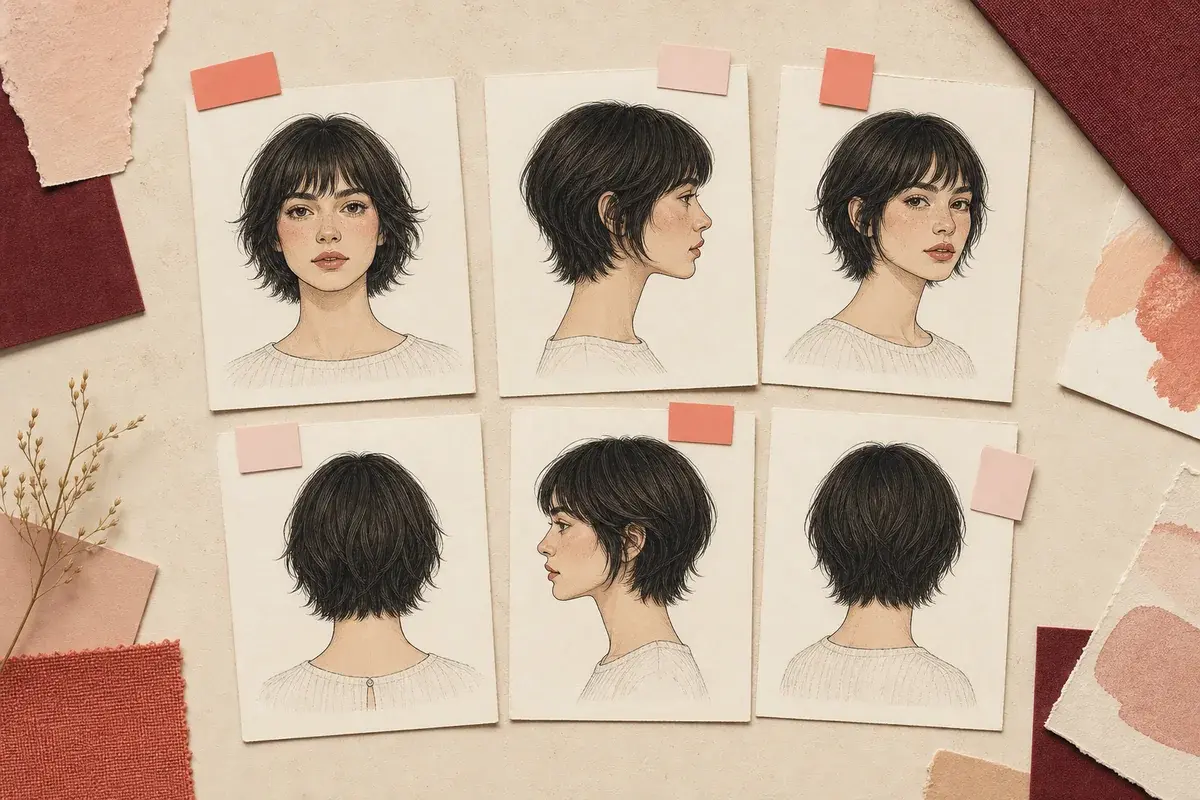
A haircut reference is useful when it reduces ambiguity. It does not need to be the most beautiful image in your folder; it needs to show the stylist what you mean by the length, outline, layers, bangs, part, or finish.
Step 1: Define the details each reference must show
Before collecting more images, list the haircut decisions you need to communicate:
- overall length and where the perimeter ends
- whether the outline is blunt, rounded, angled, tapered, or layered
- where face-framing pieces begin
- the weight and length of bangs or fringe
- parting and front direction
- natural-looking texture versus a styled finish
- back length, nape shape, or crown layers
One image rarely shows all of those clearly. Give each photo a job. For example, use a front view for bangs, a side view for face framing, and a back or three-quarter view for layers and perimeter.
| Strong reference | Weak reference |
|---|---|
| Haircut edges and layers are visible | Hat, hand, scarf, or tight crop hides the shape |
| Lighting separates the hair from the background | Dark hair disappears into a dark background |
| Angle answers a specific haircut question | Dramatic pose distorts the length or silhouette |
| Styling still reveals the underlying cut | Extensions, wind, or heavy editorial styling obscure it |
| You can say what detail you want from it | You like the overall person but cannot identify the haircut feature |
Step 2: Gather two or three complementary references
Start with a small set rather than showing your hairstylist dozens of unsorted images. In Woman & Home’s reference-photo guidance, hairstylist Michael Douglas recommends two or three images so the stylist can identify shared elements.
Your set could include:
- The anchor: the closest overall silhouette.
- The detail view: a clearer angle for bangs, layers, or the back.
- The adaptation: a related texture, density, or more realistic everyday finish.
The images do not need to show the same person. They need consistent instructions. If one has the right cut but the wrong color, label that. If another has the right bangs but too much layering, say so.
Use the women’s hairstyle directory to learn the visible differences among options such as long layers, the butterfly cut, a blunt bob, and a curly shag.
Step 3: Match the hair characteristics that matter
The reference model does not need your face shape, age, or coloring. Focus on hair traits that affect the haircut’s behavior:
- straight, wavy, curly, coily, or mixed pattern
- strand thickness and overall density
- shrinkage and spring
- visible growth patterns around bangs or crown
- current length and condition
- whether the image shows natural hair, extensions, a wig, or heavy styling
Matching every trait is unrealistic. Prioritize the characteristic that most affects your decision. If you want a curly fringe, texture and shrinkage matter more than matching the model’s face. If you want a graphic bob perimeter, strand behavior and density may matter more than color.
Add at least one real-hair image when you use an AI-generated or heavily edited reference. Hairstyle-transfer research such as StyleGAN Salon documents challenges involving pose and alignment. A polished generated image may also contain hair behavior that a stylist needs to reinterpret.
Step 4: Annotate what to keep, change, and avoid
Do not assume the stylist knows why you saved an image. Add a short note to each reference:
KEEP: [the exact length, outline, bang shape, layer movement, or texture you want]
CHANGE: [color, shorter or longer point, less volume, different part, or another adjustment]
AVOID: [the feature you do not want copied]
ROUTINE: [how you normally dry and style your hair]
Example:
KEEP: the collarbone perimeter and cheekbone-length framing.
CHANGE: preserve my current color and use my natural wave.
AVOID: the heavy curtain bangs and extra crown height.
ROUTINE: I usually air-dry and tie my hair back several days a week.
Use this salon-handoff checklist:
- two or three references with different, useful jobs
- visible front, side, or back information as needed
- keep/change/avoid notes on every image
- at least one realistic real-hair example
- an honest description of daily styling
- questions about adaptation, maintenance, and grow-out
For the full appointment conversation, turn those notes into the four-part hairstylist brief.
Common reference-photo mistakes
Saving a mood instead of a haircut
Makeup, lighting, wardrobe, and the person’s identity may drive your reaction. Crop your attention to the hair and name the feature you want.
Bringing too many unedited images
A large folder can contain contradictions. Reduce it to the few images that explain the decision.
Mixing cut and color without saying so
If you want the haircut but not the color, label the distinction before the consultation.
Hiding the relevant angle
A front-facing image cannot explain a layered back or nape. Add the angle that answers the missing question.
Treating an AI image as an exact specification
Generated hair may ignore gravity, density, shrinkage, or consistent geometry. Use it as direction and invite professional adaptation.
Preview the reference after you have chosen it
Once the references and notes are clear, follow the reference-photo preview guide. Hair Fairy Custom Style accepts a hairstyle reference, a description, or both, and can preserve the color from your source portrait when color is not part of the change.
A preview is one more consultation reference. It does not replace the original images or guarantee that your natural hair will reproduce the generated result. Review the privacy policy before uploading a portrait.
Decision summary
Bring a small, annotated set: one anchor image, one useful alternate angle, and—when needed—one example with more relevant hair characteristics. The best reference collection tells your hairstylist what to keep, what to adapt, and what not to copy.
Frequently Asked Questions
Questions about planning your haircut
How many haircut reference photos should I bring?
Two or three focused images are usually easier to discuss than a large inspiration folder. Each image should have a clear job, such as showing the length, layers, bangs, or back shape.
Should my reference photo show someone who looks like me?
The person does not need to resemble you, but matching relevant hair characteristics such as texture, density, and shrinkage can make the haircut discussion more practical.
Is one haircut reference photo enough?
It can be enough for a simple, clearly visible shape. Add another angle when the first image hides the back, perimeter, layers, or other details that matter.
Can I use a celebrity photo as a haircut reference?
Yes, if the haircut is visible. Explain which details you want so the conversation stays focused on the hair rather than the person’s face, styling, color, or image editing.
Can I bring an AI-generated hairstyle image to my hairstylist?
Yes, but pair it with at least one real-hair reference. AI images may contain geometry, density, or movement that does not translate directly to natural hair or salon work.
Should my reference show my current hair color?
Only if color is part of the decision. If you are discussing the cut alone, say that you want to preserve your current color and focus the references on shape.
About This Guide
Hair Fairy EditorialEditorial team, Hair Fairy
Hair Fairy Editorial writes and reviews Hair Fairy guides with a focus on realistic haircut decisions, clear salon communication, and styles that work beyond the inspiration photo. The team balances visual ideas with texture, maintenance, and everyday wear.
Women’s haircut selection, face-shape and texture considerations, salon-reference planning, maintenance trade-offs, clear stylist communication, and responsible use of AI hairstyle previews as decision aids rather than guarantees.
View author profileSee us more often in Google
One click marks Hair Fairy as a preferred source, so our articles are more likely to appear in your Top Stories, and can show a preferred badge in AI Mode and AI Overviews.
Compare Your Idea
Preview a hairstyle on your own photo.
Use a reference, a written description, or both—then discuss the practical result with your stylist.