
AI Hairstyle Tools
How to Turn a Hairstyle Preview Into a Salon Brief: 4 Steps
Turn a hairstyle preview into a salon brief your stylist can use, with length, shape, fringe, ends, styling and upkeep beside your before photo.
 Hair Fairy Editorial9 min read
To turn a hairstyle preview into a salon brief, choose one finalist on your own photo, open the Salon Brief under the result in Hair Fairy, check each row against your hair and routine, and save it to show your stylist. The brief puts your before photo and the preview side by side and lists what a stylist needs to discuss, from where the length ends to how often to come back. Treat it as the start of the consultation, because your stylist still adapts it to your texture, density and growth pattern.
Key Takeaways
- A Salon Brief turns a preview into salon language, with rows for length, shape, front, ends, styling, upkeep, and a Needs row when the style depends on length, extra hair or a specialist.
- Catalog styles use notes written for each style; Custom Style results get notes written from that specific preview and your description.
- Check every row before the appointment, then ask your stylist what they would change for your hair before cutting starts.
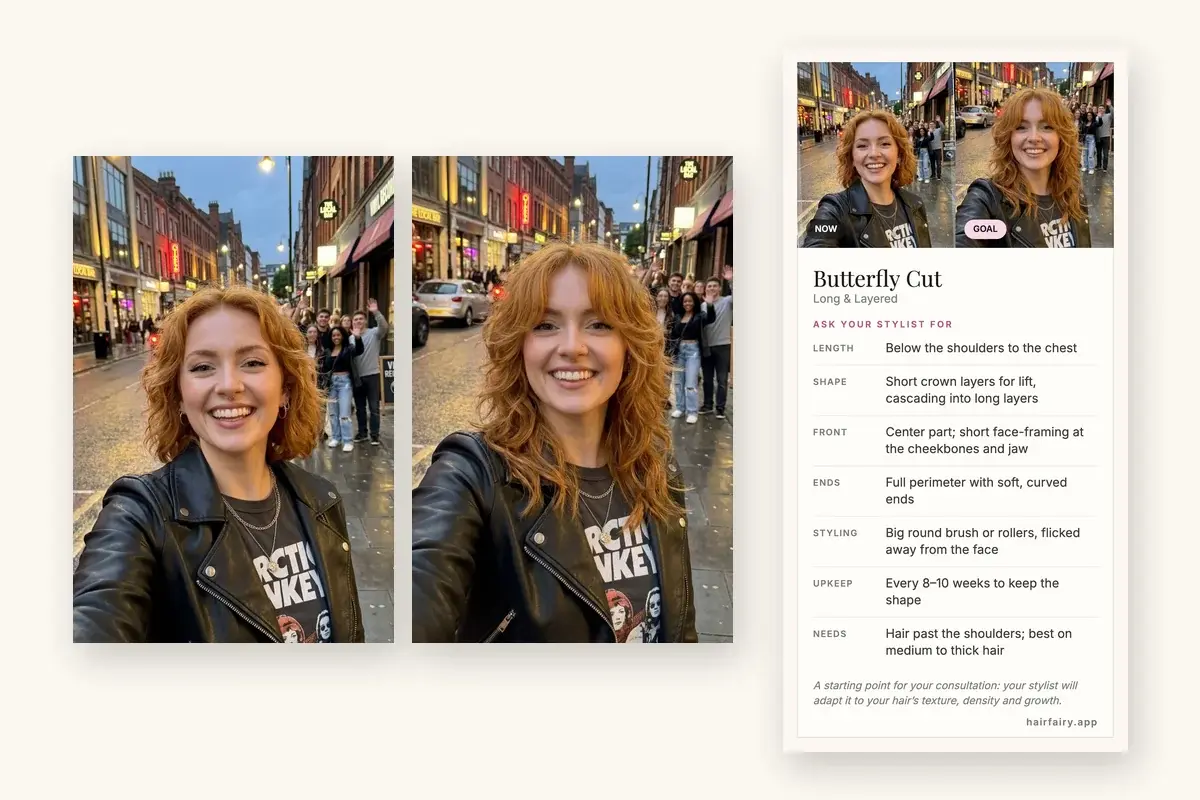
A preview shows the goal. A consultation needs words: where the length should end, where the layers start, what happens at the front, and how much styling you will actually do. The Salon Brief turns a Hair Fairy preview into those words, so you are not describing a butterfly cut from memory while your stylist waits with a comb.
If you prefer to build a brief by hand, the guide on how to tell your hairstylist what you want covers the keep, change, avoid and routine method. This guide covers the faster route from a preview you already like.
What is a Salon Brief?
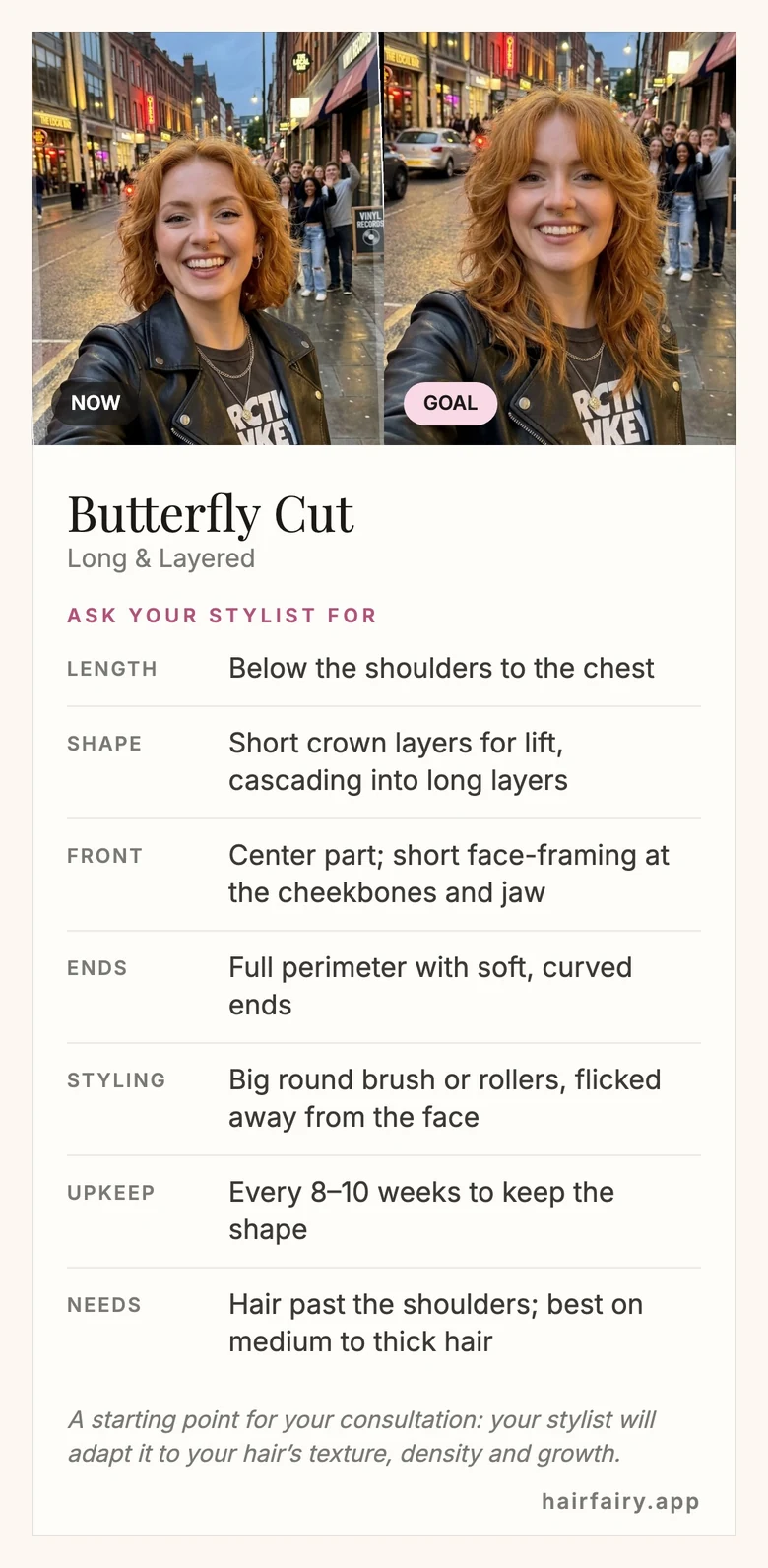
A Salon Brief is a short card built from your result: your photo labeled Now, the preview labeled Goal, the style name, and an Ask your stylist for section with one row per decision.
| Row | What it tells your stylist | Example (Butterfly Cut) |
|---|---|---|
| Length | Where the hair ends, using landmarks such as chin, collarbone or chest | Below the shoulders to the chest |
| Shape | Layers and weight, or braid and twist size for protective styles | Short crown layers for lift, cascading into long layers |
| Front | Part, fringe and face-framing | Center part; short face-framing at the cheekbones and jaw |
| Ends | How the perimeter finishes: blunt, soft or textured | Full perimeter with soft, curved ends |
| Styling | How to style it day to day, with the type of product | Big round brush or rollers, flicked away from the face |
| Upkeep | How often to go back | Every 8–10 weeks to keep the shape |
| Needs | Only when the style depends on length, extra hair, a specialist or a long appointment | Hair past the shoulders; best on medium to thick hair |
Lengths use body landmarks because that is how most stylists talk about them, with centimeters and inches only where a landmark is not precise enough.
Step 1: Preview the hairstyle on your own photo
Start with a clear, front-facing photo in soft, even light with your hair visible, then try the styles you are considering. Browse the women's hairstyle directory when you are exploring, or use Custom Style when you already have a reference photo or can describe the exact look.
Narrow the options to one finalist before you open the brief. If two previews look close, keep the same source photo and change one variable at a time, such as fringe or length, as described in the controlled hairstyle-comparison guide.
What can go wrong: a filtered or dimly lit photo can produce a preview that hides your real hairline, density or texture. A brief built on that preview starts from the wrong picture.
Step 2: Open the Salon Brief from your result
When the preview is ready, the result window shows a Salon Brief card under Download and Share. Open it to see your photo, the preview, and the rows to ask for.
- Catalog styles use notes written once for each style in the Hair Fairy catalog, in plain salon language and without brand names. For example, the Butterfly Cut brief always asks for short crown layers that cascade into long layers.
- Custom Style results get notes written for that specific preview, based on the image and your description, so a curtain fringe you described is reflected in the Front row.
Opening the brief does not use an image. On a preview made without paid images, the card is visible but locked.
Step 3: Check each row against your hair
Read the brief before the appointment rather than in the chair. For each row, ask whether it fits your hair as it is today:
- Length: Do you have that much length now? A stylist can remove length but cannot add it. If the brief says chest length and your hair ends at the collarbone, you may need months of growth or extensions first.
- Shape: How much weight can you lose? Short crown layers give lift on medium or thick hair but can make fine hair look sparse at the ends. The guide to fine, medium or coarse hair explains the difference between strand size and density.
- Front: Does the fringe or face-framing suit your hairline and cowlicks? A strong cowlick can lift a blunt fringe; mention it.
- Ends: Would you rather keep a fuller perimeter? A blunt line makes the ends look thicker, while a textured edge looks softer and lighter.
- Styling: Will you do it on a normal morning? If the brief says round brush but you air-dry, say so, and ask the stylist to cut for your real routine.
- Upkeep: Can you book that often? Precise shapes, such as bobs and fringes, lose their line sooner; see how often to get a haircut.
- Needs: If this row appears, plan for it. It flags things like a curl specialist, a braider, a long appointment or extra hair that a standard booking may not cover.
Step 4: Show the brief to your stylist and talk it through
Save the brief as an image so you have it at the appointment without a signal, or share it into a message or booking app. At the consultation, show it and say something like:
I'd like to try this butterfly cut. Keeping the length below my shoulders, with short layers at the crown, face-framing from the cheekbones, and soft ends. I mostly air-dry. What would you change for my hair?
That last question matters most. Your stylist can see what the preview cannot: how dense your hair is, how it grows at the crown, how it behaves as it dries, and whether the condition supports the shape. Agree on the shortest acceptable length and the plan before cutting starts. If you want backup images, the guide to choosing haircut reference photos explains how to pick one or two that show the back and sides.
How to adjust the brief for your hair type
The brief describes the cut itself. Adjust the conversation for your hair:
- Curly or coily hair: read every length as a dry length, because curls shrink as they dry. Ask for the shape to be cut or checked dry, and see how to prepare for a curly haircut appointment.
- Fine hair: ask to keep more weight at the ends than the brief suggests, especially with heavily layered styles.
- Thick or coarse hair: ask how bulk will be removed so the shape sits close to the head instead of widening.
- Growing out a previous cut: show the stylist where your current layers sit, because old layers can limit the new shape for a few months.
Common mistakes
- Treating the brief as a guarantee. The preview is an AI image and a decision aid. It cannot measure your hair or predict how it will grow, move or dry.
- Skipping the Needs row. If a style needs length, extra hair or a specialist, a quick trim will not get you there.
- Showing only the Goal photo. The Now photo shows your stylist where you are starting, which matters as much as where you want to end up.
- Leaving out your routine. The Styling row describes the look in the preview; your stylist can only cut for an easier finish if you say what you will actually do.
- Not asking what they would change. A good stylist adapts the shape to your hair. Invite that before the cut, not after.
Decision summary
Preview the hairstyle on your own photo, open the Salon Brief from the result, check each row against your hair and routine, then save it and talk your stylist through it. The brief gives you salon language for the look you chose; the consultation turns it into the right cut for your hair. Try a hairstyle on your photo to get your first brief.
Frequently Asked Questions
Questions about AI hairstyle comparisons
What is a Salon Brief?
A Salon Brief is a short card you can show your hairstylist. Hair Fairy builds it from a hairstyle preview, with your before photo, the preview, the style name, and rows for length, shape, front, ends, styling, upkeep, and anything the style needs.
Who can open the Salon Brief?
The Salon Brief opens on results made with paid images, and opening it does not use an image. On a preview made without paid images, the card is visible but locked.
Does the Salon Brief work for Custom Style looks?
Yes. Catalog styles use fixed notes written for each style. For a Custom Style result, Hair Fairy writes the notes from the preview and your description, in the same plain salon language.
Can I use a Salon Brief for curly or coily hair?
Yes. Read lengths as dry lengths, because curls and coils shrink as they dry. Many curly briefs include a Needs row suggesting a stylist who cuts curls, often dry, so the shape can be checked as it will sit.
Should my stylist follow the brief exactly?
No. Use it as the starting point of the consultation. Your stylist can see your density, growth pattern, cowlicks and condition, so ask what they would change before the first cut.
Does the brief replace reference photos?
It complements them. The brief summarizes one preview in salon terms, while one or two real reference photos can show details such as the back or a curl pattern that a single front-facing preview cannot.
About This Guide
Hair Fairy EditorialEditorial team, Hair Fairy
Hair Fairy Editorial writes and reviews Hair Fairy guides with a focus on realistic haircut decisions, clear salon communication, and styles that work beyond the inspiration photo. The team balances visual ideas with texture, maintenance, and everyday wear.
Women’s haircut selection, face-shape and texture considerations, salon-reference planning, maintenance trade-offs, clear stylist communication, and responsible use of AI hairstyle previews as decision aids rather than guarantees.
View author profileSee us more often in Google
One click marks Hair Fairy as a preferred source, so our articles are more likely to appear in your Top Stories, and can show a preferred badge in AI Mode and AI Overviews.
Compare Your Idea
Preview a hairstyle on your own photo.
Use a reference, a written description, or both—then discuss the practical result with your stylist.